

Every time I built something with Claude Code, the rhythm was the same. I wrote a prompt. I read what came back. I noticed it was half done. I typed “keep going.” I checked again, caught a bug, pointed it out, waited. An hour later I had a feature and a sore typing finger.
I was the thing deciding, every single step, whether to continue. The moment I walked away, it stopped.

Then I watched Boris Cherny, the head of Claude Code at Anthropic, say he does not really do that anymore.
In a recent talk, he said Claude Code went from writing 10 to 20 percent of his code to replacing his editor entirely. He uninstalled his IDE after not opening it for a month. And the part that stopped me: instead of prompting by hand, he now writes loops. Automated workflows that prompt Claude and decide what to build next. His job shifted from coding to orchestrating. He called it “the golden age of the generalist,” where designers, chiefs of staff, and finance people all ship real software.
The talk is here, it is worth 30 minutes.
The strange part: I had already built the pieces
When I looked back at my skills folder, I found something funny. Over the last two and a half months, I had quietly built a whole set of small skills, each one solving a single problem I kept hitting. I just never saw them as one thing.
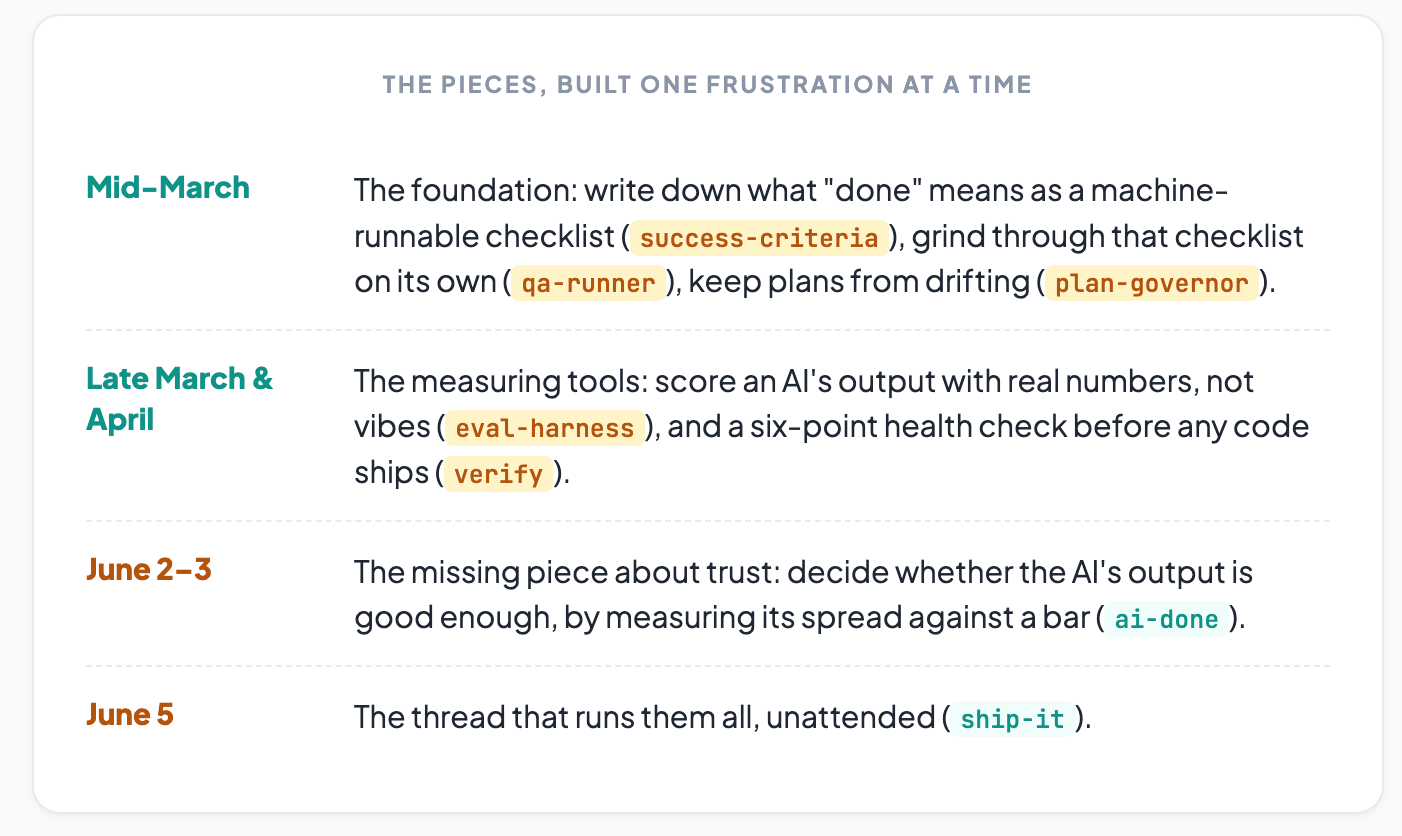
The missing piece was about trust
There was one problem none of those tools solved: how do you know an AI’s output is actually good?
Regular software is a vending machine. Same input, same output, “all tests pass” means done. But anything with a language model inside it is different. The same prompt gives different answers across users, sessions, and model updates. What you shipped is not a fixed thing. It is a range of behaviors.
A few weeks ago I read an article by Jeff Gothelf called “What ‘done’ means when you’re shipping AI features.” One line stuck: if “done” is the language of a build culture, “calibrated” is the language of a learning culture. An AI feature is never simply done. It is calibrated. You have decided the variance you will accept, planned for the ways it fails, and you keep watching after launch.
Two days later I built a skill for exactly that (ai-done). It is the piece that decides whether the AI part of a product is good enough, not by a checkbox, but by measuring the spread of its output against a bar I set.
Then I tied them all together. I call it Ship It
Ship It is not a new capability. It is a thread.
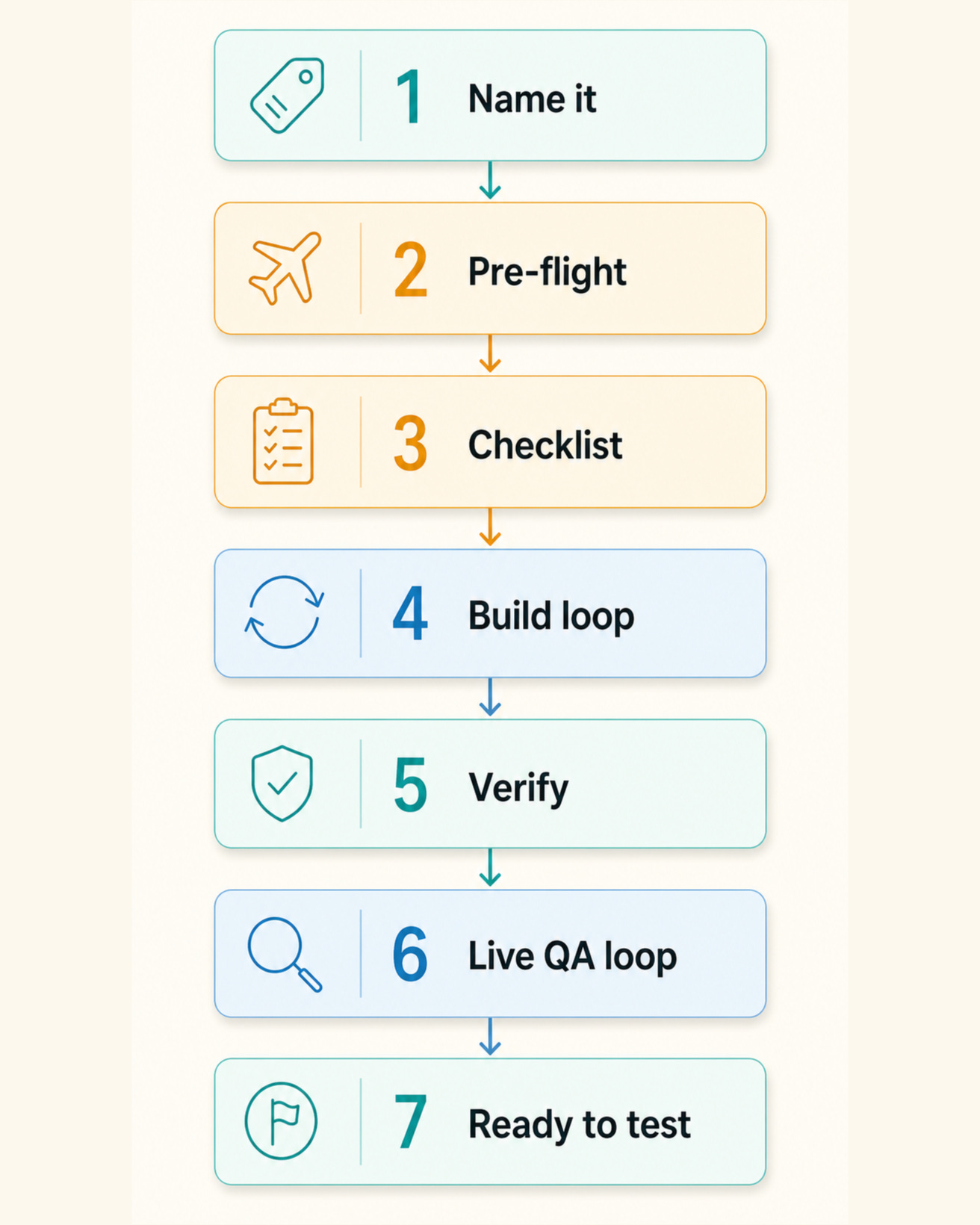
You name a feature once, and it runs all of those skills in order, on its own. It asks me up front for anything only I can give, like a password or a login. It writes the checklist first. It builds in a loop while fixing its own bugs. It runs the health check. It calibrates anything with AI in it. Then it opens the real thing in a browser and QAs it, like a user would, until it actually works. It only comes back to me when it is ready to test.
The mechanism underneath is almost silly in how simple it is. There is a small script that fires every time Claude tries to end its turn. If the checklist is not all green yet, the script hands Claude the same instruction again and says “keep going.” Claude looks at the files it already changed, sees where it got to, and does the next piece. Try to stop, get handed the task again. That is the loop that prompts itself.
The real lesson: the loop is the easy part. Anyone can write “keep going until done.” The hard, valuable part is the verifier, the checklist that defines “done” so precisely a machine can check it. Without it, a self-prompting loop either runs forever or lies that it finished. With it, you can walk away. The verifier is the product, not the loop.
Where this is going: the cloud, and the context problem
Boris does not just run loops. He runs them in the cloud, on a schedule, without his laptop staying on. That is where I want to go, and there is an honest catch worth naming.
The limit on a long autonomous run is the context window, the model’s short-term memory. Let one run go too long and it fills up, starts summarizing itself to make room, and slowly gets dumber. There is no magic “context is full, hand off cleanly” button yet. That part is genuinely unsolved.
But here is the trick that makes it not matter. You do not run one giant session. You run many short ones. Anthropic has a feature called Routines: a scheduler that runs Claude Code on their own machines, pulls your project from GitHub, and fires on a timer, your laptop closed. So you set it to run, say, every hour. Each run is a fresh, empty mind. It opens the checklist, sees what is still unchecked, does a bounded chunk of work, commits it, and stops, well before its memory fills. The next hour, a brand-new run reads the same checklist and continues.
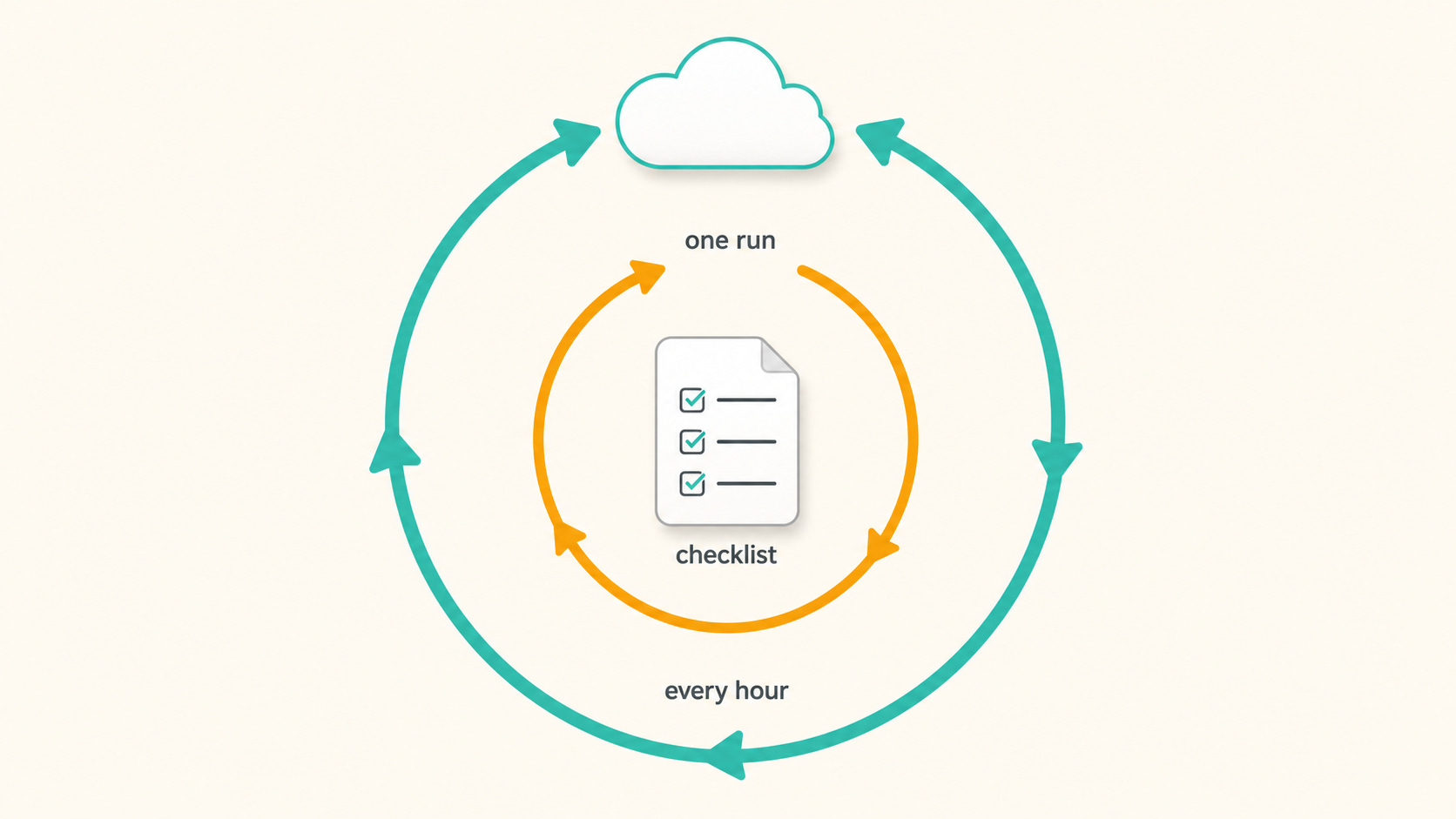
It is two loops stacked. The inner loop, inside one run, keeps prompting itself until the checklist passes or it hits a turn limit you set. The outer loop, the hourly schedule, keeps starting fresh runs until every item is finally ticked. Because no single run is ever long enough to fill the context window, the wall is never hit. The checklist sitting in the repo is the thread that ties all those short runs into one long job.
The reason it works is the same reason Ship It works at all: the memory lives in files, not in the conversation. A fresh session is never starting from zero. It just reads the list and keeps going.
The shift was never a tool
What changed for me was not a clever skill. It was a stance.
Stop being the loop. Start designing the verifier, the thing that knows when the work is truly done, and let the loop run against it.
The golden age of the generalist is real. And the wild part is, you might already have built most of the pieces. You just have to thread them.
Till next time, Cheers!
Previous column articles can be found here: